Testing
Unit test individual steps and integration test entire workflows using Vitest.
Testing is a critical part of building reliable workflows. Because steps are just functions annotated with directives, they can be unit tested like any other JavaScript function. Workflow DevKit also provides a Vitest plugin that runs full workflows in-process — no running server required.
This guide covers two approaches:
- Unit testing - Test individual steps as plain functions, without the workflow runtime.
- Integration testing - Test entire workflows in-process using the
workflow()Vitest plugin. Required for workflows that use hooks, webhooks,sleep(), or retries.
Unit Testing Steps
Without the workflow compiler, the "use step" directive is a no-op. Your step functions run as regular JavaScript functions, making them straightforward to unit test with no special configuration.
Example Steps
Given a workflow file with step functions like this:
import { sleep } from "workflow";

export async function handleUserSignup(email: string) {
  "use workflow";

  const user = await createUser(email);
  await sendWelcomeEmail(user);

  await sleep("5d");
  await sendOnboardingEmail(user);

  return { userId: user.id, status: "onboarded" };
}

export async function createUser(email: string) {
  "use step";
  return { id: crypto.randomUUID(), email };
}

export async function sendWelcomeEmail(user: { id: string; email: string }) {
  "use step";
  // Send email logic
}

export async function sendOnboardingEmail(user: { id: string; email: string }) {
  "use step";
  // Send email logic
}
Writing Unit Tests for Steps
You can import and test step functions directly with Vitest. No special configuration or workflow plugin is needed:
import { describe, it, expect } from "vitest";
import { createUser, sendWelcomeEmail } from "./user-signup";

describe("createUser step", () => {
  it("should create a user with the given email", async () => {
    const user = await createUser("test@example.com");

    expect(user.email).toBe("test@example.com");
    expect(user.id).toBeDefined();
  });
});

describe("sendWelcomeEmail step", () => {
  it("should send a welcome email without throwing", async () => {
    const user = { id: "user-1", email: "test@example.com" };
    await expect(sendWelcomeEmail(user)).resolves.not.toThrow();
  });
});
This approach is ideal for verifying the business logic inside individual steps in isolation.
Unit testing works well for individual steps. A simple workflow that only calls steps can also be unit tested this way, since "use workflow" is similarly a no-op without the compiler. However, any workflow that uses runtime features like sleep(), hooks, or webhooks cannot be unit tested directly because those APIs require the workflow runtime. Use integration testing for testing entire workflows, especially those that depend on workflow-only features.
Integration Testing with the Vitest Plugin
For workflows that rely on runtime features like hooks, webhooks, sleep(), or error retries, you need to test against a real workflow setup. The workflow/vitest plugin handles everything automatically — it compiles your workflow directives, builds the runtime bundles, and executes workflows entirely in-process. No server required.
Inside integration tests, which run the full workflow runtime, vi.mock() and related calls do not work. To test steps with mocked step dependencies, use unit tests instead. Instead of using mocks in integration tests, consider dependency injection or environment variable-based conditional logic.
Vitest Configuration
Create a separate Vitest config for integration tests that includes the workflow() plugin:
import { defineConfig } from "vitest/config";
import { workflow } from "@workflow/vitest";

export default defineConfig({
  plugins: [workflow()],
  test: {
    include: ["**/*.integration.test.ts"],
    testTimeout: 60_000, // Workflows may take longer than default timeout
  },
});
That's it. The plugin automatically:
- Transforms
"use workflow"and"use step"directives via SWC - Builds workflow and step bundles before tests run
- Sets up an in-process workflow runtime using a fresh Local World instance in each test worker
Use a separate Vitest configuration and a distinct file naming convention (e.g. *.integration.test.ts) to keep unit tests and integration tests separate. Unit tests run with a standard Vitest config without the workflow plugin, while integration tests use the config above.
Writing Integration Tests
Use start() to trigger a workflow and await run.returnValue to get the result:
import { describe, it, expect } from "vitest";
import { start } from "workflow/api";
import { calculateWorkflow } from "./calculate";

describe("calculateWorkflow", () => {
  it("should compute the correct result", async () => {
    const run = await start(calculateWorkflow, [2, 7]);

    expect(run.runId).toMatch(/^wrun_/);

    const result = await run.returnValue;
    expect(result).toEqual({
      sum: 9,
      product: 14,
      combined: 23,
    });
  });
});
Testing Hooks and Waits
The real power of integration testing comes when testing workflow-only features. Hooks and waits can be resumed programmatically using the workflow/api functions, making it straightforward to simulate external events in your tests.
Given a workflow that waits for approval via a hook, then sleeps before publishing:
import { createHook, sleep } from "workflow";

export async function approvalWorkflow(documentId: string) {
  "use workflow";

  const prepared = await prepareDocument(documentId);

  using hook = createHook<{ approved: boolean; reviewer: string }>({
    token: `approval:${documentId}`,
  });

  const decision = await hook;

  if (decision.approved) {
    // Wait 24 hours before publishing (e.g. grace period for retractions)
    await sleep("24h");
    await publishDocument(prepared);
    return { status: "published", reviewer: decision.reviewer };
  }

  return { status: "rejected", reviewer: decision.reviewer };
}

async function prepareDocument(documentId: string) {
  "use step";
  return { id: documentId, content: "..." };
}

async function publishDocument(doc: { id: string; content: string }) {
  "use step";
  console.log(`Publishing document ${doc.id}`);
}
You can write an integration test that starts the workflow, waits for the hook and sleep to be reached, then resumes them programmatically:
import { describe, it, expect } from "vitest";
import { start, getRun, resumeHook } from "workflow/api";
import { waitForHook, waitForSleep } from "@workflow/vitest";
import { approvalWorkflow } from "./approval";

describe("approvalWorkflow", () => {
  it("should publish when approved", async () => {
    const run = await start(approvalWorkflow, ["doc-123"]);

    // Wait for the hook to be created, then resume it
    await waitForHook(run, { token: "approval:doc-123" });
    await resumeHook("approval:doc-123", {
      approved: true,
      reviewer: "alice",
    });

    // Wait for the sleep to be reached, then skip it.
    // waitForSleep returns the sleep's correlation ID, which can be
    // passed to wakeUp() to target a specific sleep in the workflow.
    const sleepId = await waitForSleep(run);
    await getRun(run.runId).wakeUp({ correlationIds: [sleepId] });

    const result = await run.returnValue;
    expect(result).toEqual({
      status: "published",
      reviewer: "alice",
    });
  });

  it("should reject when not approved", async () => {
    const run = await start(approvalWorkflow, ["doc-456"]);

    await waitForHook(run, { token: "approval:doc-456" });
    await resumeHook("approval:doc-456", {
      approved: false,
      reviewer: "bob",
    });

    // No wakeUp() needed here — the rejected path has no sleep
    const result = await run.returnValue;
    expect(result).toEqual({
      status: "rejected",
      reviewer: "bob",
    });
  });
});start(), resumeHook(), and getRun().wakeUp() are the key API functions for integration testing. Use start() to trigger a workflow, resumeHook() to simulate external events, and wakeUp() to skip sleep() calls so tests run instantly. waitForSleep() and waitForHook() from workflow/vitest let you wait for the workflow to reach a specific point before resuming. See the API Reference for the full list of available functions.
Testing Webhooks
Webhooks are hooks that receive HTTP Request objects. In tests, resume them using resumeHook() with a Request payload — no HTTP server needed:
import { createWebhook } from "workflow";

export async function ingestWorkflow(endpointId: string) {
  "use workflow";

  using webhook = createWebhook({
    token: `webhook:${endpointId}`,
  });

  const request = await webhook;
  const body = await request.text();
  const data = await parsePayload(body);

  return { endpointId, received: data };
}

async function parsePayload(body: string) {
  "use step";
  return JSON.parse(body);
}import { describe, it, expect } from "vitest";
import { start, resumeHook } from "workflow/api";
import { waitForHook } from "@workflow/vitest";
import { ingestWorkflow } from "./ingest";
describe("ingestWorkflow", () => {
it("should process webhook data", async () => {
const run = await start(ingestWorkflow, ["ep-1"]);
await waitForHook(run, { token: "webhook:ep-1" });
// Resume the webhook with a Request object
await resumeHook(
"webhook:ep-1",
new Request("https://example.com/webhook", {
method: "POST",
body: JSON.stringify({ event: "order.created", orderId: "123" }),
})
);
const result = await run.returnValue;
expect(result).toEqual({
endpointId: "ep-1",
received: { event: "order.created", orderId: "123" },
});
});
});Use resumeHook() (not resumeWebhook()) when testing webhooks with the Vitest plugin. resumeWebhook() handles HTTP-specific concerns like response routing that aren't relevant for in-process testing. Since a webhook is fundamentally a hook with a Request payload, resumeHook() works directly.
Manual Setup
If you need more control over the test lifecycle, the plugin also exports the individual setup functions:
import { defineConfig } from "vitest/config";
import { workflowTransformPlugin } from "@workflow/rollup";

export default defineConfig({
  plugins: [workflowTransformPlugin()],
  test: {
    include: ["**/*.integration.test.ts"],
    testTimeout: 60_000,
    globalSetup: "./vitest.integration.setup.ts",
    setupFiles: ["./vitest.integration.env.ts"],
  },
});import { buildWorkflowTests } from "@workflow/vitest";
export async function setup() {
await buildWorkflowTests();
}import { beforeAll, afterAll } from "vitest";
import {
setupWorkflowTests,
teardownWorkflowTests,
} from "@workflow/vitest";
beforeAll(async () => {
await setupWorkflowTests();
});
afterAll(async () => {
await teardownWorkflowTests();
});For advanced setups that require a running server (e.g. testing against your actual framework's HTTP layer), see Server-based integration testing.
Debugging Test Runs
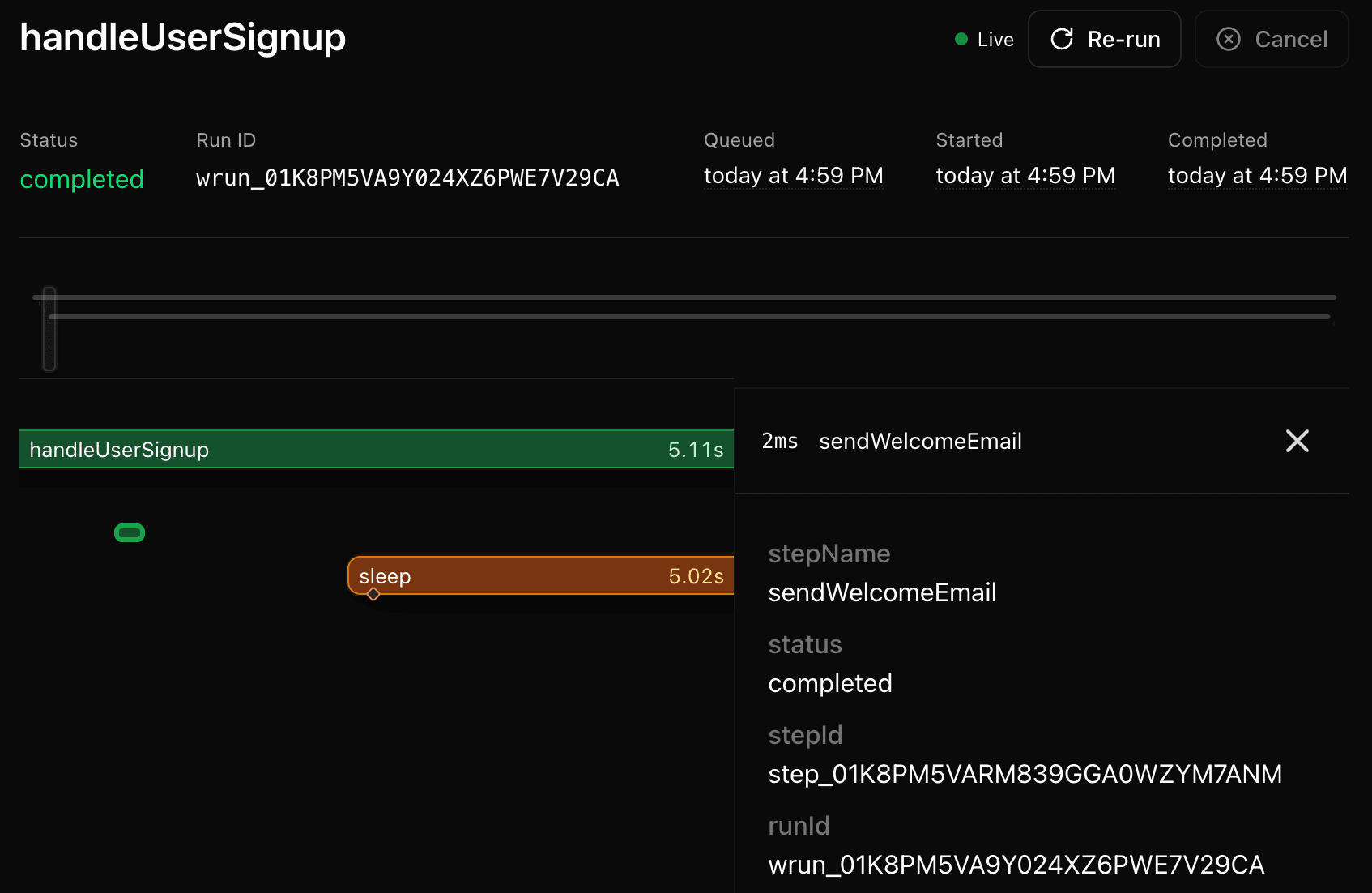
When integration tests fail, the Workflow DevKit CLI and Web UI can help you inspect what happened. Because integration tests persist workflow state locally, you can use the same observability tools you would use in development.
Launch the Web UI to visually explore your test workflow runs:
npx workflow webOr use the CLI to inspect runs in the terminal:
# List recent workflow runs
npx workflow inspect runs

# Inspect a specific run
npx workflow inspect runs <run-id>
The Web UI shows each step, its inputs and outputs, retry attempts, hook state, and timing. This is especially useful for diagnosing issues with hooks that were not resumed, steps that failed unexpectedly, or workflows that timed out.
See the Observability docs for the full set of CLI commands and Web UI features.
Best Practices
Separate Unit and Integration Tests
Keep two test configurations:
- Unit tests - Standard Vitest config, no workflow plugin. Fast, no infrastructure required.
- Integration tests - Vitest config with
workflow()plugin. Tests the full workflow lifecycle including hooks, sleeps, and retries.
Use Custom Hook Tokens for Deterministic Testing
When testing workflows with hooks, use custom tokens based on predictable values (like document IDs or test identifiers). This makes it easy to resume the correct hook in your test code.
Set Appropriate Timeouts
Workflows may take longer to execute than typical unit tests, especially when they involve multiple steps or retries. Set a generous testTimeout in your integration test config.
Test Error and Retry Scenarios
Integration tests are the right place to verify that your workflows handle errors correctly, including retryable errors, fatal errors, and timeout scenarios.
Further Reading
- Hooks & Webhooks - Pausing and resuming workflows with external data
start()API Reference - Start workflows programmaticallyresumeHook()API Reference - Resume hooks with datagetRun()API Reference - Check workflow run status and wake up sleeping runswaitForSleep()andwaitForHook()- Test helpers for polling workflow state- Vite Integration - Set up the Vite plugin
- Observability - Inspect and debug workflow runs with the CLI and Web UI
- Server-based testing - Integration testing with a running server
This guide was inspired by the testing approach described in Mux's article Launching durable AI workflows for video with @mux/ai, which demonstrates how Mux uses the workflow/vite plugin with Vitest to integration test their durable AI video workflows built on Workflow DevKit.